AI is now a standard line item on HR software roadmaps — copilots, smart assistants, predictive analytics, writing help. The capabilities vary widely. What is less often explained is where the model runs, what data it can access, and how it fits the workflows your HR team already runs.
We build NoviManager HRMS, a human resource management platform for growing organizations. This article shares how we think about AI in that context: what a complete HRMS covers first, which AI patterns we see often in the market, where deployments tend to stall, and what separates AI that teams actually use from AI that stays in the demo deck.
It is not a product walkthrough. It is a practical frame for evaluation — whether you are buying, building, or reviewing what you already have.
What a complete HRMS is (before we talk about AI)
AI only helps if there is a system worth assisting. A complete HRMS is not a chat window with an employee list behind it. At minimum, it connects:
- People records — directory, profiles, documents, org structure
- Time off — balances, requests, manager approval, notifications
- Role-based access — employees see their world; managers see their team; admins govern the org
- Oversight — audit trails on sensitive actions, not just pretty dashboards
Employees self-serve. Managers approve. HR and admins run the org. When those workflows live in one application — not spreadsheets, not email chains — AI has something concrete to work with. Without that foundation, AI features tend to sit on the surface rather than shorten real work.
When HR AI works in demos but not in daily use
AI absolutely has a place in HR software. The challenge is a recurring set of deployment patterns that look strong in a sales cycle and fade once teams return to normal operations:
1. Generic sidebar chatbots
A floating assistant that answers broad HR questions — “What is PTO?” — with text similar to a handbook PDF. If it is not connected to your leave policy, your balances, or your approval chain, employees often revert to email after the first week.
2. Copilot as a separate experience
Users log into the HRMS for tasks, then open a different panel for “AI.” When the assistant cannot see the screen in context — the pending approval, the directory view, the form in progress — adoption usually stays low. One login, two workflows.
3. Predictions without a next step
Attrition risk scores and engagement summaries can be valuable, but only when they connect to action — a report, an approval path, a follow-up task. Dashboards that show insight without a clear workflow rarely change how HR teams work day to day.
4. Recruitment AI positioned as platform AI
Resume screening and candidate ranking are valid use cases, but they serve hiring — not the operational work managers and admins handle every week: leave approvals, directory updates, document control.
5. Client-side or opaque integrations
When inference runs in the browser or through a third-party widget with separate terms, organizations lose visibility into how HR data meets the model. Security and compliance teams often block or restrict these setups — which is understandable given the sensitivity of people data.
The common thread is integration: AI that is not part of how the application is used week to week tends to remain optional, then unused.
AI capabilities common in modern HRMS — and how to read them
These features appear frequently on roadmaps and RFP checklists. Below is a neutral reading of what each is meant to do, and what usually determines whether it delivers value in production.
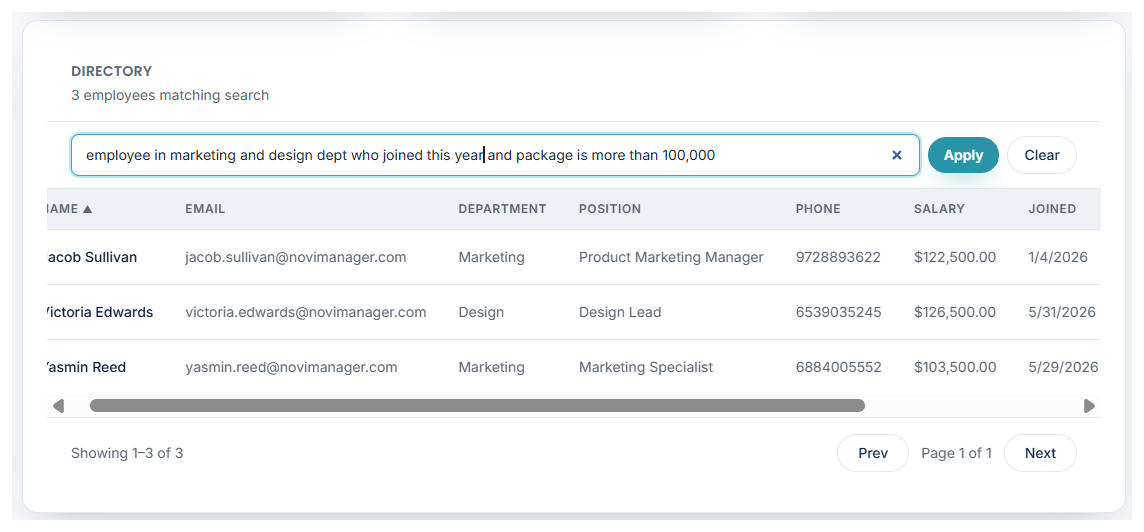
- Natural-language employee search — e.g. “IT hires from last year, excluding management.” Strong when parsed server-side against live directory data with correct admin permissions. Weaker when it is essentially a keyword field with a new label.
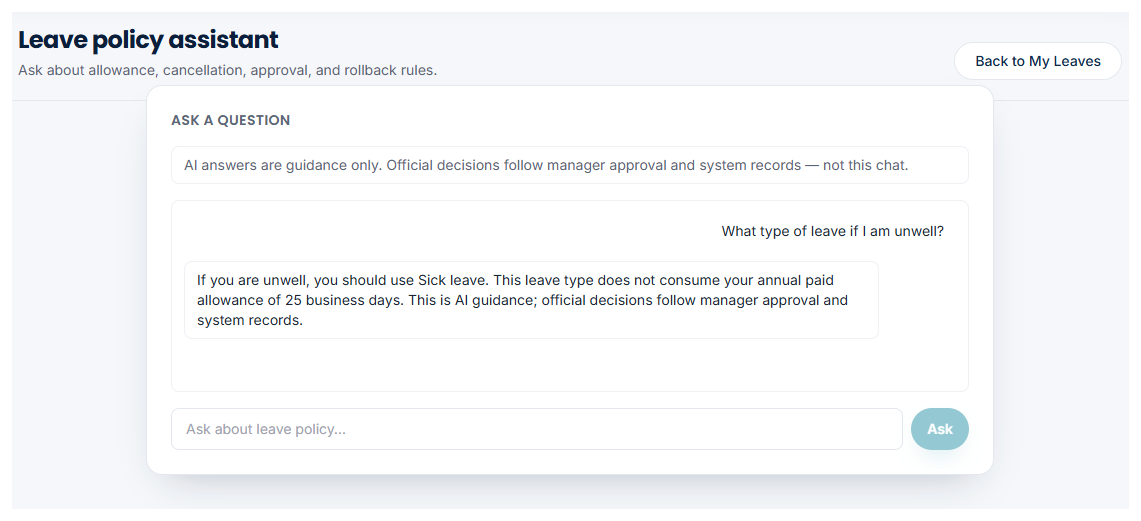
- Policy and handbook Q&A — Answers about leave rules, approval steps, cancellation. Works well when read-only and grounded in published policy. Risk increases when the model fills gaps with guesses.
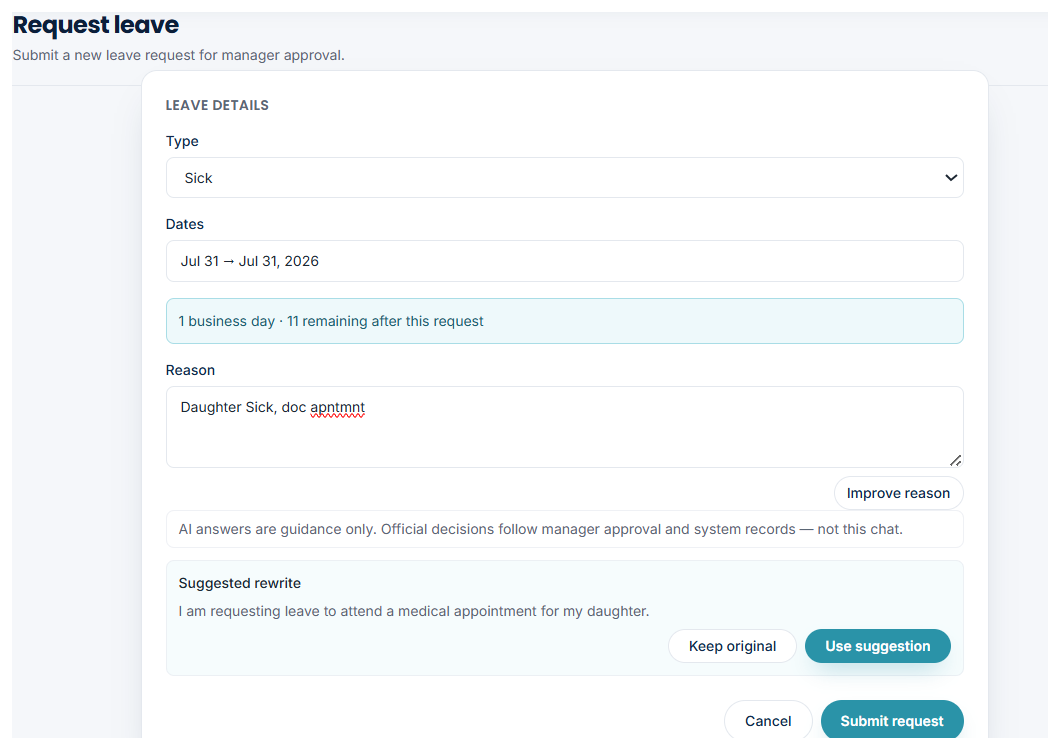
- Writing assistance on forms — Help phrase a leave reason or polish a bio. Best with preview and explicit confirm-before-submit. Problematic when text is submitted without user review.
- Manager queue summaries — Short overview of pending approvals. Useful when generated from the queue the manager is about to work through — less so from stale exports.
- Document classification and search — Tag suggestions, descriptive search. Often helpful for admins managing large document volumes; lower priority for smaller teams.
- Analytics narratives — Plain-language summaries of headcount or attrition. Occasional value for leadership; rarely a daily operational tool.
- Sentiment and engagement analysis — Survey or message analysis. Can be sensitive politically; many organizations leave it disabled.
Features that tend to stick are those attached to a task someone already performs inside the HRMS — not standalone “intelligence” with no clear handoff.
Principles for AI that teams keep using
When we evaluate AI for NoviManager, we use a short checklist. The same questions apply whether you are selecting a vendor or designing in-house:
Embedded in the workflow
Assistance should appear where the work happens — directory, leave request, manager queue — rather than on a separate “AI” screen users must remember to open.
Same identity and permissions as the app
Roles and row-level access should apply to AI the same way they apply to the UI. If a user cannot view certain data in the grid, the model should not expose it through chat.
Server-side inference
Processing on your API keeps credentials off client devices, supports logging, and aligns with how most organizations already host HR systems.
Assist, don’t decide
Suggest a rewritten leave reason; the employee submits. Summarize pending approvals; the manager still approves or rejects. State changes should stay with an accountable human.
Read-only where policy is involved
Policy Q&A should reflect documented rules and system data — not plausible-sounding answers when the handbook is silent.
Auditability
HR platforms already rely on audit trails for sensitive actions. AI should fit that culture of record-keeping, not bypass it.
How we apply this in NoviManager
NoviManager HRMS is built as a full platform first — directory, documents, leave lifecycle, manager approvals, admin audit, role dashboards — with AI added where it meets the principles above.
Today that includes server-side natural-language search on the employee directory, read-only leave policy Q&A, and inline help drafting a leave reason with a preview the employee confirms before submit. Manager queue summaries and broader dashboard assistance are on the roadmap under the same constraints: scoped data, human confirmation, no automated approvals.
We have deliberately avoided a generic HR chatbot on the login screen and AI-driven decisions on compensation, discipline, or other areas that require a clear human owner and audit trail. That scope is a product choice, not a limitation of the underlying models.
Questions worth asking in an HRMS evaluation
If AI is a major part of the pitch, these questions help clarify whether it is operational or ornamental:
- Where does inference run — your cloud, our cloud, or the user’s browser?
- What data can the model access, and is it filtered by the user’s role in real time?
- Which screens include AI today — not “on the roadmap,” today?
- Can the AI change system state without a human confirmation step?
- How are prompts and responses logged for compliance review?
- If we disable AI, does the HRMS still function as a complete application?
A mature HRMS should remain fully usable with AI turned off. The assistant should accelerate work, not define whether the platform qualifies as HR software at all.
Summary
AI in HR software works when it is specific, permission-aware, and embedded in workflows people already run — search, policy clarification, form help, approval summaries. It struggles when it is generic, disconnected from org data, or presented as a substitute for core HR capabilities.
For teams evaluating platforms, the practical sequence is straightforward: confirm the HRMS covers daily operations for employees, managers, and admins; then assess where AI removes friction without adding risk. That is the approach we take with NoviManager, and the lens we recommend for any serious review.